
Free on every plan
A/Side, the desktop helper.
A small, free app that runs on the computer your drives are plugged into. It does the part of post that happens on a hard drive, so you can stay in the cut.
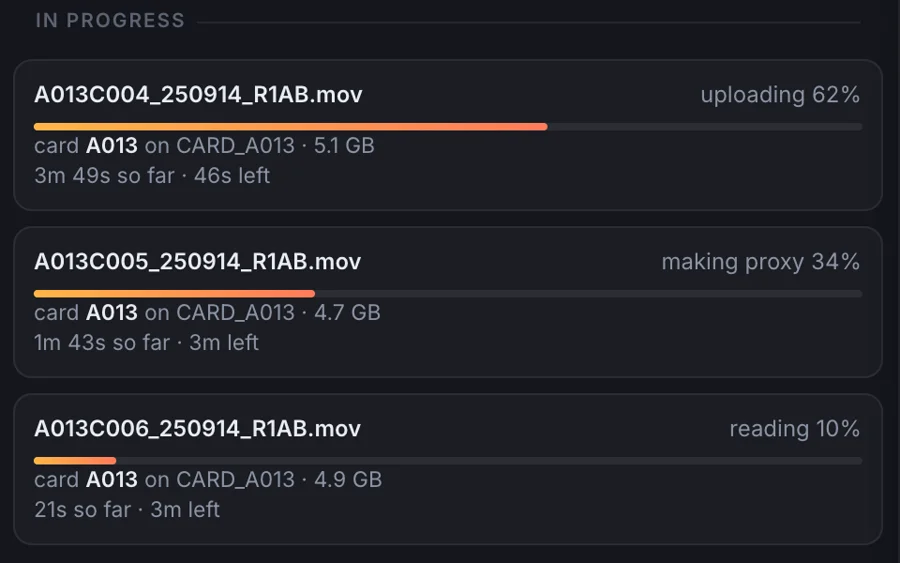
Download B/side for Mac or Windows. A/Side comes inside it and starts by itself, so you drop a recording into B/side and it comes in. One helper can feed several projects at once, and its window shows what it is working on, what is still to come card by card with about how long is left, and what is done. Nobody ever copies a key around.
What it does
Brings your footage to the team
Footage on the machine your drives are plugged into comes in for everyone, grouped the way it was shot, so it can be cut from any computer.
Never loses your raw
Point it at two drives. It copies every card to both and checks each copy against the card. Then it tells you when the card is safe to format.
Plays what the browser cannot
Camera formats a browser cannot open on its own are ingested for you, so every clip on the card cuts.
Makes ProRes
When the cut needs to leave as a ProRes file, the helper makes it on your own machine.
Questions
Is the desktop helper free?
Yes, on every plan, including Free.
Does it open my network to the internet?
No. It makes outbound connections only and accepts none coming in.
Do I need it to start cutting?
It is what ingests your footage. On a Mac or PC it comes inside the B/side app and starts by itself, so you do not install it separately. Once footage is in, you can cut in the app or in Chrome.
Which computer should it run on?
The one your drives are plugged into. At a facility that is often a machine in the machine room; at home it is your own computer.